¶ Deployment
All settings are made in the values.yml file.
¶ Create a wikijs namespace
First create the WikiJS namespace via kctl
kubectl create namespace wikijs
Next, create the Postgresql secret
kubectl apply -f resources/postgres-auth-secret.yml
¶ Install ArgoCD manifest
The following command deployes the application via argocd.
kubectl apply -f manifest.yaml -n argocd
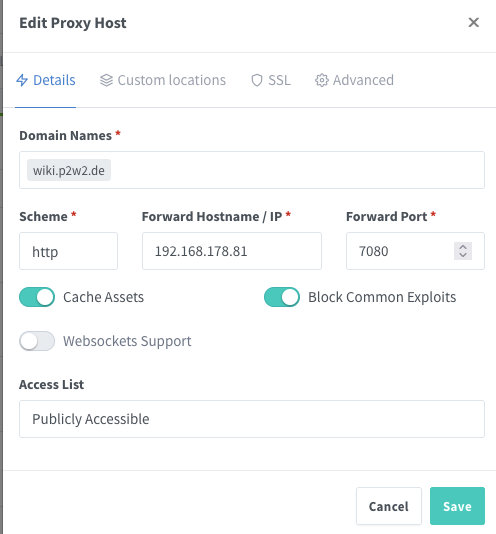
¶ Access via wiki.p2w2.de
To access the wiki create the NGINX route and an SSL Certificate.
Create an SSL Certificate and enable "Force SSL" in the SSL Tab.
¶ Backup WIKI data
The data is backed up via Gitlab: Wiki-backup-repository
To Sync the repo with the wiki instance got to Storage->Settings->Git.
Use the Following cofiguration settings:
Authentication Type: ssh
Repository URI: [email protected]:homelab3635645/wiki.git
Branch: main
SSH Private Key Mode: contents
SSH Private Key Path: >empty<
SSH Private Key: >Create or use a Gitlab Private key<
Verify SSL Certificate: Active
Username: >empty<
Password: >empty<
Default Author: [email protected]
Default Author Name: P2W2
Local Repository Path: ./data/repo
Git Binary Path: >empty<
Sync Direction: Bi-directional